Posts

Learn 'how to code'

Image
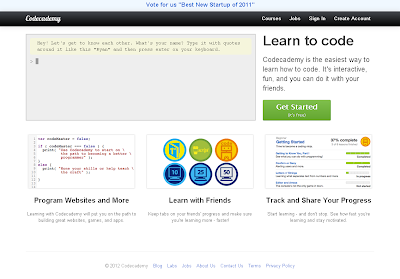
So today I was just reading and going through the tech news and I found out an extremely cool and interactive website that helps people to 'how to code'. So here i am presenting a review for the pretty pretty site I loved :). This site is for all those tech and geeky fellows out there who loves coding or wish to seek career in development. The site is called Codecademy , presented by Zach and Ryan. It’s a startup, a global hit indeed which just raised a 2.5 Million funding , which teaches you how to code in lessons form. A user is presented with an editor in which he is guided with step by step programming courses. On clearing some steps he is transferred to next step, a next lesson, he is also presented with virtual rewards and badges. After clearing and learning basic programming concepts he is then taught with JavaScript concepts. Codeacademy Home page The site is open for all, to post and share different programming lessons. Available topics are JavaScript, Python, Ruby...

Download and Save an Excel Sheet using QTP

During automation we might have came across scenarios which requires selecting group of data and downloading an Excel file and then save it on a particular location. Automating Excel sheets requires correct steps to follow. At first you have to create an Excel object and then to save, you have to choose a dynamic location and it should not be machine dependent. So here i am presenting a quick function that serves the discussed purpose. Step 1. Make a vbs file i.e open notepad copy the below code and save it with a .vbs extension. [Name].[vbs]. Step 2 . Add the function in QTP resources. Browse file > Settings > Resources tab. Step 3 Now Call the function in your code where required. Use keyword 'Call' ''''''Function initializing Public Function ExcelExport() ''''''Check excel button existence If (Browser("name:=.*").Page("title:=.*").WebButton("html id:=some ID").Exist(1)) the...

Get and Compare Runtime URLs using QTP

This article will help you in getting the run-time URL of your website and comparing with user defined i.e from datatable, if that is correct it logs into the application otherwise exits the application When you are automating your application using QTP, you might have to deal with multiple URLs, i.e. if your application is deployed on multiple Servers / Environments, every time you run your script, it has to be configured with correct credentials. Here is a quick function that can be applicable in all such conditions. Make a VBS file. Open notepad, copy the below code and save the file with .vbs extension, Now provide login credentials, i.e. username and password in your datatable and Call the function we just made. '''''Function Declaration Public Function FunctionName()  '''''Gets the runtime URL and assign the value in the variable browserURL=Browser("title:=page title").Page("url:=page url").GetROProperty("URL...

Top 5 Google Product Reviews

Image
Google has engaged itself to roll out many cool and amazing releases this year by providing user with a better,easy and faster experience to stay connected and search even more accurate. Here I will be discussing some very useful and effective releases in forms of tools, apps, plug-in and many more that are been launched up til now. +1 the pretty cool recommendation tool While using your Google account, you must have noticed a small icon having + along with a 1 with it. This is Google’s new search capability shorthand as “this is pretty cool”, which provides user with much appropriate and quicker result. It works in a social way by that I mean it takes recommendations from your own people, friends, family, coworkers, and people in your contact list and display you list of recommended results. To recommend just click on +1 on any webpage or ads you browsed. One just needs to have an upgraded Google profile to enjoy this new search experience. This surely results to be very useful for t...

An Easy Quicky start to HP's Qucik Test Professional (QTP)

Image
For a long time I have been working on HP's Quick Test Professional abbreviated as QTP which is HP's or Mercury ( HP bought Mercury) product. It is a graphical interface record-playback automation tool used for Automated functional testing for desktop,Web ActiveX controls, and Visual Basic applications. This is a great software and I would be recommending all the testers and Quality assurances to have their hands on this software. You can also Google to find millions of articles based on QTP. So here today i will be presenting some very basic learning lessons for the newbies which I have experienced so far while using this fabulous,rich and huge automated testing giant (Apologies to the other automated software's, this is purely an individual opinion). First of all let us have a look at the Interface (The window) and gets familiar.Below is a screen shot depicting the window along with the descriptions. QTP works on Actions, your activity is recorded or scripted in a defau...