Posts

Showing posts with the label VuGen

How to open Loadrunner analysis results on a 64 bit machine

Image
A lot of you must have been facing issues when your Loadrunner software is installed on a 64 bit operating system. Here I am primarily focusing on loadrunner earlier versions i.e. 9.5 which does not support 64 bit architecture. The VuGen and Analysis specifically will not be working at all. If you have successfully passed the load, your results will not be opened and you might experience the following error: LR Analysis Error  So after some random googling and experimenting I came around with a fix. But for that you need to have 2 versions of loadrunner. One earlier version which you have been using like 9.5 and one latest version i.e 12. So lets follow the below steps to open your load test results: First of all create your script in the LR 12 version. (you will not be able to create script in LR 9.5 installed on a 64 bit OS, IE will not be launched.) After the script has been successfully made and replayed, save the script. Copy and place the folder in your 9...
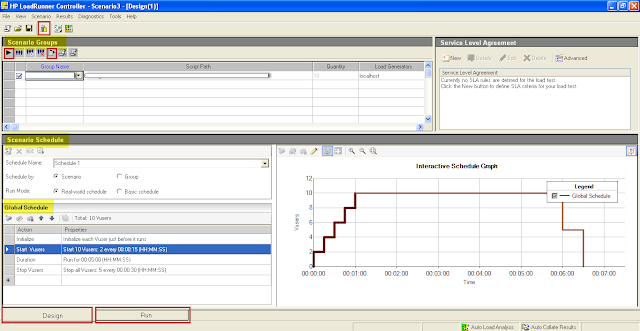
LoadRunner Controller

Image
This is my second post from the HP LoadRunner series. As I discussed earlier, here I will be discussing an overview of LoadRunner Controller . So before going into detail, let me recap the prerequisites. Create script – Checked Replay Script – Checked Updating script if required (Add transaction, Parameterization and Content Check) – Checked  Runtime settings and Iterations – Checked Assuming the script is absolutely fine i.e. error free and ready to be passed on Controller, let us get familiar with the UI first. I will be using LoadRunner 9.5, the screens may vary at your end depending on the version you are using.   The UI The Controller has a Title bar, Menu bar, tool bar and a Status bar. After these we have multiple sections or panes.   The first is Scenario Groups pane. We can add multiple scripts or a single script and name them as a Group.  Next is Scenario schedule, here we define how the load will be passed and executed. We have two types o...

A quick Overview on HP LoadRunner VuGen

Image
As the name suggests, LoadRunner is an automated performance testing product by HP . It works by generating actual load on the server, by replacing human users with the virtual user also know as a VU.    Let us understand and create a load test. In this post I will be working on LoadRunner version 9.5 so the UI may vary with the latest version 11.5x . As I discussed in my earlier post, the LoadRunner is categorized in four components.  The product is so vast that it cannot be covered in a single post. So, I will be covering LoadRunner in multiple posts. Keep visiting for updates!! Virtual user Generator (VuGen) Also known as VuGen, this component allows capturing end user business processes by generating an automated script against the performed actions. To open VuGen, Click on Start button >> Programs >> LoadRunner >> Applications >> Virtual User Generator. Let us get familiar with the interface. On opening the VuGen, you will ...