Posts

Load / Stress testing tools

Being a part of software industry for many years, I have came across multiple group of people having diverse thoughts. Being a QA I often share my experiences with fellow colleagues and friends. One important question whose answer is typically vague and not convincing to me is over the ‘LOAD / STRESS TESTING’.  Recently I was engaged in a project which requires load testing, so I shoot a message in my social and professional circle to know, if anyone can suggest and guide me over a good tool. I was little shocked to hear most of the replies that they have never performed a load testing activity. Okay I admit load testing can be expensive, but being an expert and experienced resource in the field and still have no knowledge is quite unpleasant for me (No offence to anyone). So there I pull my socks up, grab a cup of tea and started little research over the top available load testing tools. Here I will be sharing my recommendations and experiences over the top load testing tools...
To do’s - while Software Testing

You may find thousands of articles on the discussed topic so what’s so new and catchy in my post?? Below are the lists of to-do’s I have learned from my experience under the field of being a quality assurer. So let’s start. Viewers are most welcome to share their thoughts, experiences following a comment below :) So here we go with some quick tips. Its just a initial draft, as there are many things which needs to be tested, some are scenario dependent, some application, so we have alot f constraints. I will be adding things time to time whenever i recall things, so keep checking. Exploratory testing – think like a dumb user who just have started using the computer and have no idea where and what to click. Test all possible unrealistic scenarios. [NOTE : Exploratory testing varies as per target audiences, if your software is meant for the professionals than exploratory testing level varies, you need to focus more on functional, Client requirements than, focusing on system fa...

Girls who CODE

I have been working in Software industry for about three years now. From the time I have been engaged in this industry, I have encountered men (no hard feelings) who discourages and thinks girls cannot be good developer(s). Is it??? Nahh not for me, for I believe that girls can be very good developers, I’ve met a lot of excellent female developers at work. Not denying the fact that guys can be technically more mature. But that does not make the girls less technical. They can be better specially when talking about the esthetics and User interfaces (UI). Mostly a guy’s main focus / point of concentration is towards the logic / underlying business and not on UI. And this is what I call totally opposite from what a Client thinks and wants. Being a quality engineer, I have met clients whose first impression are set on the UI more rather than how it will be functioning. Well this topic can lead to a big discussion so I will zip it here, what I will be posting today is a very interesting ...

Testing Cross site scripting

A lot of time the QA's or the testers have to came across testing cross site scripting or XSS scenarios. Fixes for XSS defects will ultimately require code based fixes. So here i will be discussing some manual operations which can be performed by a QA / tester to verify the site integrity and security against xss. Step 1. Open any Web site in a browser, and look for places on the site that accept user input such as a search form or some kind of login page. Enter the word test in the search box and send this to the Web server. Step 2. Look for the Web server to respond back with a page similar to something like "Your search for 'test' did not find any items" or "Invalid login test." If the word "test" appears in the results page, you are in luck. Step 3. To test for Cross-Site Scripting, input the string " " without the quotes in the same search or login box you used before and send this to your Web server. Step 4. If...

Learn to Code - Codeacademy v/s Treehouse

Image
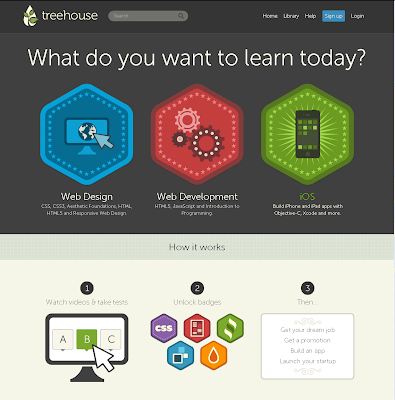
Few months back I shared an article ‘Learn to code’ introduced by the team Codeacademy which lets you build and explore coding practices , experiences in an interactive manner. Today I am here to present another impressive learning site, sharing the same goal i.e. to teach programming online. Competitor Treehouse , teaches web design, web development and iOS in form of video tutorials and quizzes. So what’s the difference between both of them and which should you join in? The answer from my side would be yes to both, experience what is more comfortable and easy for yourself. Treehouse Home page Although I found Codeacademy much interactive as they present an editor to play with and at the time you are done playing, you found out that you were actually learning while playing. Fun isn’t it? And mainly because Codeacademy is free of cost hurray :) Well on the other hand Treehouse sound impressive as well but you need to be a paid user to enjoy the benefits of the site. Two pl...

Working with WebRadioGroup

QTP WebRadioGroup means a radio button on the web page. Identifying and working with them can be easy or difficult. Sometimes they works out fine and at times executing the same code gives you error. If you have two radio buttons on the screen for example Gender selection options the code below might give problem. Browser("").Page("").WebRadioGroup("").Select "M" Where "M" can be the id or the value of the radio button (Spy the object). So what is the problem in the code above? As there are two radio buttons QTP identifies them as same, so we need to differentiate between them. Index is a property by which you can differentiate, it tells the position of the object. So if we write the same code below with an additional index property it will work fine. Browser("").Page("").WebRadioGroup("html id:=" ,"index:= 1").Select "M". This code is intended to select a radio button among two, what ...

Incremening DataTable values using DP

If you ever came across a situation in which you need to login into the application and do separate steps than you might be interested in this post. One way to do so is to change action properties and change it to run on all rows, but that will be executing when it completes 1 cycle. what i will be doing here is, dealing with nested actions, a main action will be calling another actions. For example you have a login action and one more action that selects one of the three options on the basis of login id. So you login the system three times every time with a different id. Create a global sheet paramenter runCount that will stores login count and another parameter currecntCount that will select the option. Its always a good practice to create a main action that calls other actions. So the main action will look like this. ''''''Initialize a variable ''''''Set runCount = 1 in datatable i = DataTable("runCount",dtGlobalShe...